It’s 9:14 on a Tuesday and a customer wants to know why their invoice is wrong.
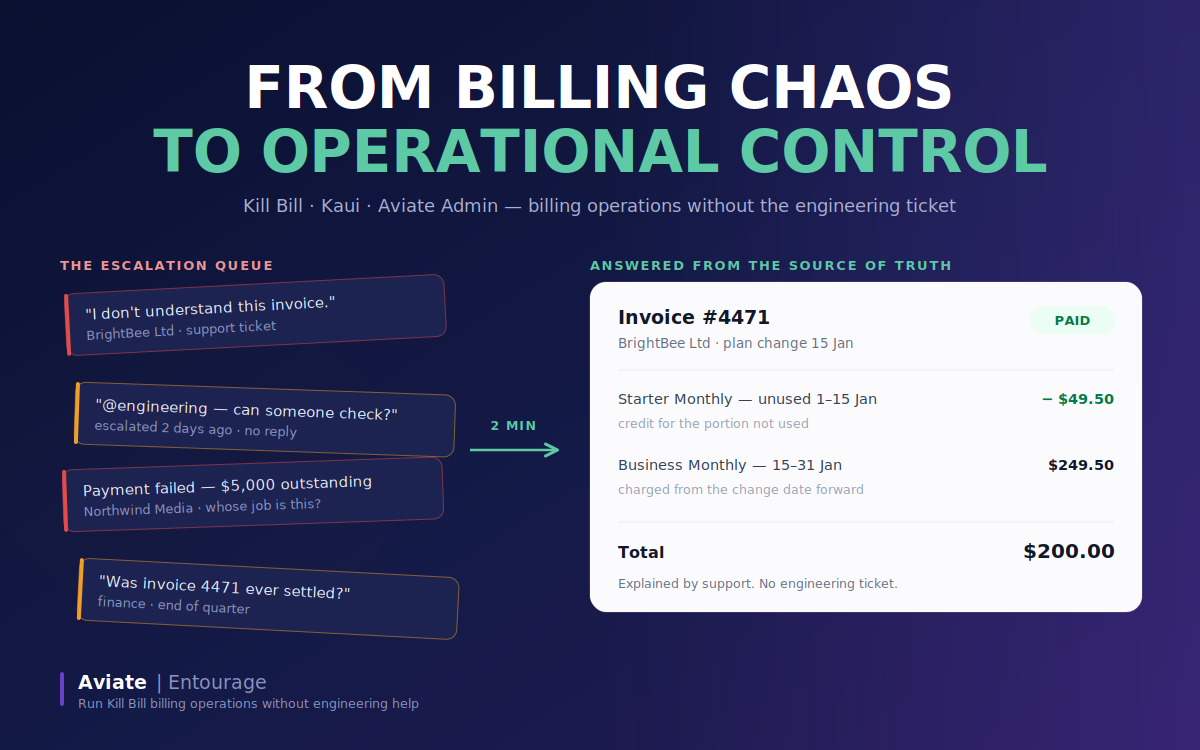
It isn’t wrong. They upgraded from Starter to Business halfway through the month, so the invoice credits the unused half of the old plan and charges for the new one from the change date. It’s correct, it’s explainable, and somebody just needs to open the account and read it back to them.
So – who?
In a lot of subscription businesses the honest answer is an engineer with database access. Support escalates. An engineer runs a query between two other things. A two-minute answer takes two days.
Now multiply that by every failed payment, every disputed charge, every time finance asks whether invoice 4471 was ever settled. Billing has quietly become an engineering support queue, and nobody decided that it should.
The engine was never the problem
Kill Bill handles the hard part well. It models subscriptions, computes invoices, processes payments, and records an audit entry for every state change. As a billing engine it is genuinely production-grade, and it has been running serious revenue infrastructure for years.
But an engine answers questions through an API. The people who actually field billing questions – support agents, billing operations, finance — don’t work through APIs. So the capability exists and the access doesn’t, and the gap between the two gets filled by engineers.
This is the operations problem, and it’s distinct from the engine problem. Most billing stacks solve one or the other. Some give you a powerful engine only engineers can drive. Others give you a friendly UI that hides so much you can’t answer anything unusual. Kill Bill solved the engine problem a long time ago. The operational surfaces are what close the rest of the gap.
Three layers, three jobs
Kill Bill stays the system of record. Subscriptions, invoices, payments, and history live here, and nothing above it holds a competing copy of the truth.
Kaui is the account-level operations console. It’s where you search for a customer, open their subscriptions, trace a plan change to its exact date, read an invoice line by line, and act on a payment. It’s the tool for a question that starts with a customer’s name.
Aviate Admin is the environment-level view: which tenant is live, what the catalog contains, what the configuration looks like. It’s the tool for a question that starts with “what are we actually selling right now.”
These two are complementary, not competing. Aviate Admin doesn’t replace Kaui and isn’t trying to – it answers a different class of question. An operator typically uses both in the same investigation: Aviate Admin to establish what environment and catalog they’re looking at, Kaui to work the specific account. Together with Kill Bill underneath, that combination is what makes billing operations something a non-engineering team can own..
What that looks like in practice
We built a demo around a fictional B2B SaaS company, Acme Cloud Analytics, running four plans from Starter at $99 a month up to Enterprise at $18,000 a year, plus a few add-ons.
The customer above is BrightBee Ltd. In Kaui, an agent searches the account, opens the subscription timeline, and finds the change from Starter Monthly to Business Monthly with the date it took effect. The invoice raised that day shows exactly two relevant lines: a credit for the unused remainder of the Starter period, and a charge for Business from the change date to the end of the period. The agent can now explain the number to the customer using the same screen the billing engine used to produce it. No query, no ticket.
A second account, Northwind Media, has a $5,000 annual invoice that hasn’t been paid. The same person can open the account, see the balance, inspect the payment state, and resolve it – either by taking payment against the invoice or recording one received outside the system. That’s the part worth noticing: this isn’t only inspection. It’s an operational action taken against the system of record by the team closest to the customer.
And every one of those actions is recorded with who did it and when. That audit trail isn’t a compliance checkbox – it’s the precondition for handing billing operations to a non-engineering team at all. You can delegate the work because you can always reconstruct what happened.
Why it matters beyond the ticket queue
The obvious benefit is fewer interruptions and faster answers. The less obvious one is that billing complexity grows faster than customer count. More customers means more plan changes, more mid-cycle edge cases, more questions that don’t fit a template. If every one of those routes through engineering, the bottleneck tightens as the business grows – precisely when you can least afford it.
None of this makes billing code-free. Designing a catalog, modelling a pricing change, integrating a payment gateway – that’s still engineering work, and it should be. What changes is that operating the system day to day stops requiring an engineer, which is a different claim and a more defensible one.
See it for yourself
We’ve published the full demo: five walkthroughs covering environment overview, catalog visibility, the BrightBee investigation, the Northwind payment issue, and the audit trail. Each one is a clickable demo you can step through without signing up for anything.
The billing operations documentation has all five chapters, the demo catalog, and the four seeded accounts, so you can follow along or rebuild the environment yourself. The billing operations page has the short version if you’d rather just watch the customer investigation play out.