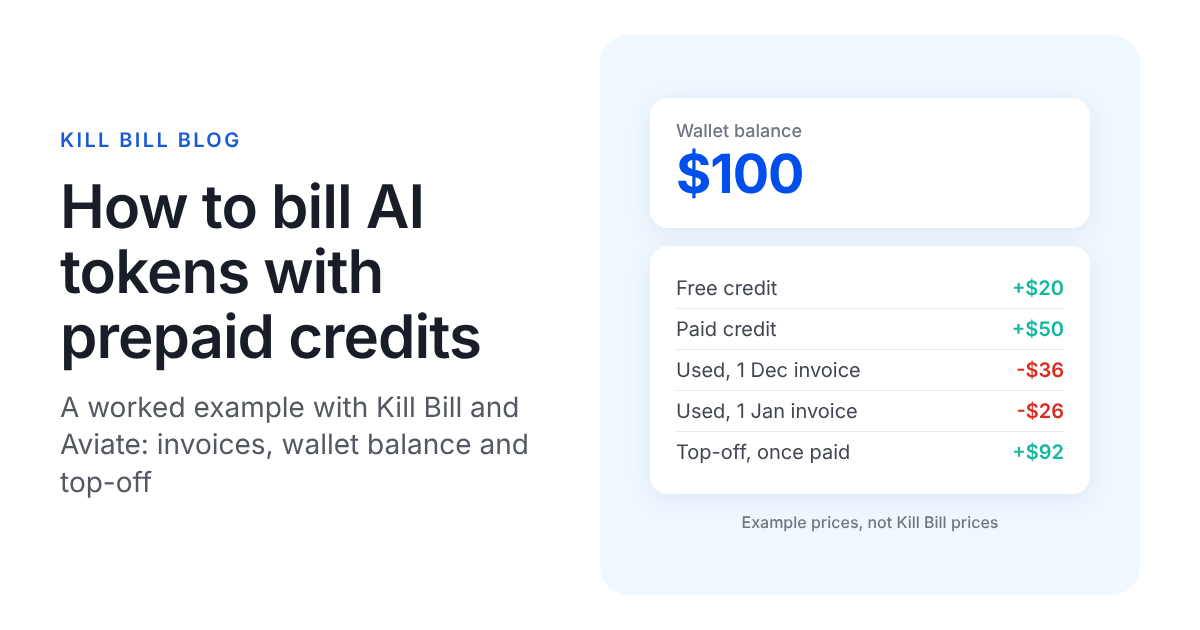
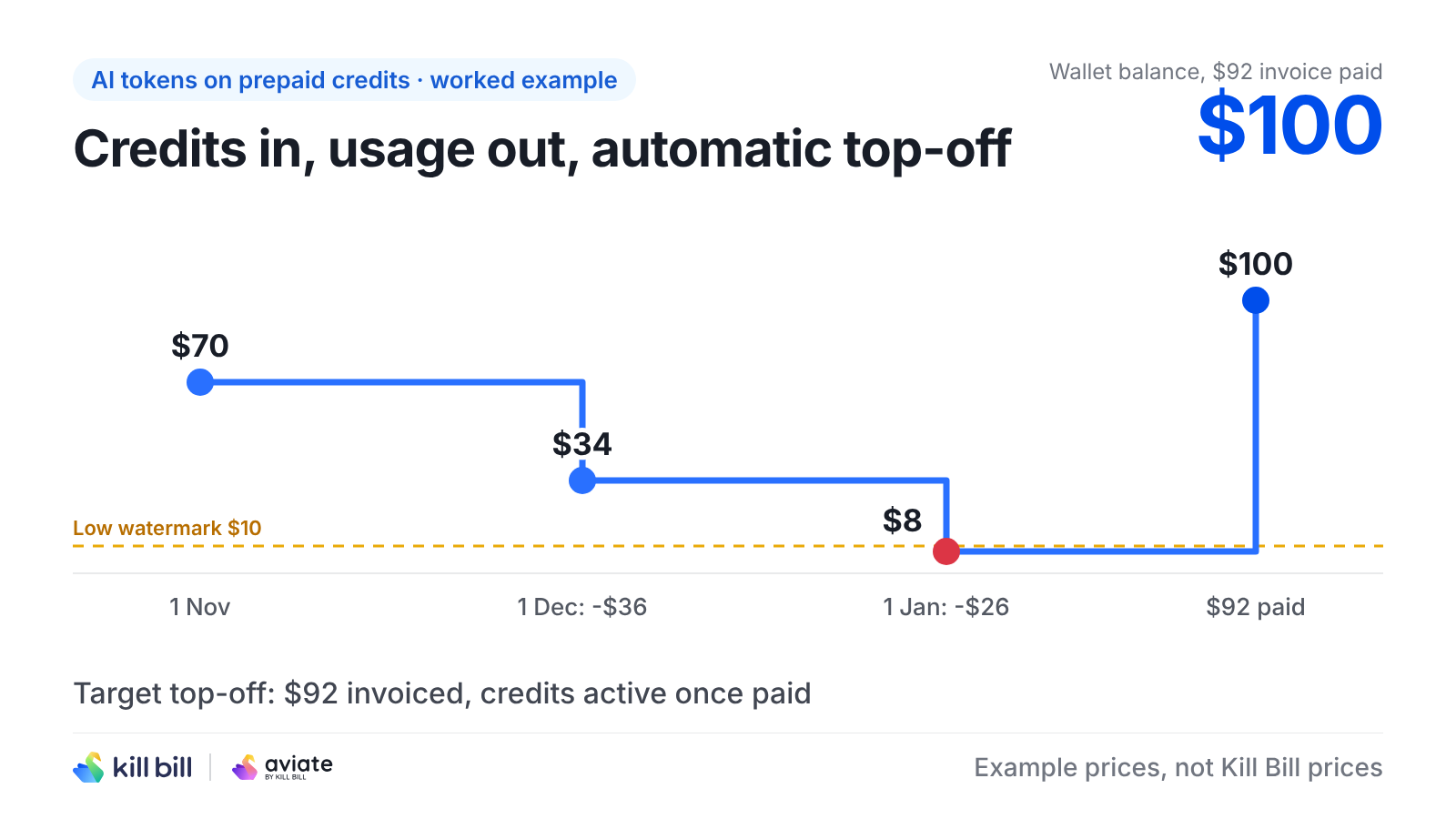
Short answer: To bill AI tokens with prepaid credits, you need four parts: a meter that counts the tokens, a usage plan that prices them, a wallet that holds the customer’s credits, and a top-off rule that buys more credits when the balance drops below a threshold. In Kill Bill, usage plans and invoicing are open source; raw-event metering and wallets are part of Aviate, our commercial product built on Kill Bill. In the example below, $70 of credits covers a $36 usage invoice (balance $34); a second $26 invoice drops the balance to $8, below a $10 low watermark, and a $92 top-off brings it back to $100 once paid.
A customer gets $20 of free credits, buys $50 more, and sends 18 million input tokens in November. This article follows that customer through two usage invoices and one top-off.
What do you need to bill AI tokens with prepaid credits?
You need four parts. A meter counts the tokens. A usage plan prices them. A wallet holds the customer’s credits. A top-off rule buys more credits when the balance drops below a threshold you set.
Usage pricing and invoicing are open-source Kill Bill. Raw-event metering and wallets are Aviate features.
1. A meter
A billing meter defines what you measure: API calls, tokens, minutes, storage. Your application sends usage events, each with a quantity, for example 150 API calls.
2. A usage plan
The plan prices the meter. In our example, the plan charges $2.00 per block of 1,000,000 input tokens (example plan price), billed monthly. It is the plan used in the documented AI tutorial. Kill Bill bills usage after the period, from the usage recorded for that period.
To keep the example small, it prices input tokens only. AI plans usually price output tokens separately.
3. A wallet
An account can have one wallet: a credit pool in the account’s currency. You can add two kinds of credits. Free credits, such as a sign-up bonus, create no invoice. Paid credits create an invoice, and Kill Bill attempts payment with the account’s default payment method. When usage is invoiced, the system records the credits used.
4. A top-off rule
When the balance falls below a low watermark, the wallet buys more credits. A fixed top-off always adds the same amount. A target top-off adds what is needed to reach a target balance. Each top-off creates an invoice for the credits bought.
What does a month look like?
A customer signs up on 1 November.
- They receive $20 of free credits.
- They buy $50 of paid credits. Kill Bill invoices $50 and the payment succeeds.
- The wallet holds $70.
During November, their application sends 18,000,000 input tokens to the meter.
On 1 December, the usage is invoiced:
| Usage line (illustrative) | Quantity | Example price | Amount |
|---|---|---|---|
| Input tokens | 18 blocks of 1M | $2.00 | $36.00 |
Wallet credits are applied to this usage invoice. The balance goes from $70 to $34.
The account has a target top-off: low watermark $10, target $100. On 1 January, December usage is invoiced: 13 blocks, $26. The balance goes from $34 to $8, below the watermark. The wallet buys $92 of credits to bring it back to $100, and Kill Bill invoices the $92. The credits are added once that invoice is paid.
The example at a glance
| When | What happens | Invoice | Wallet balance |
|---|---|---|---|
| 1 Nov | $20 of free credits | None | $20 |
| 1 Nov | $50 of paid credits | $50, paid | $70 |
| 1 Dec | November usage: 18 blocks of 1M input tokens | $36, covered by credits | $34 |
| 1 Jan | December usage: 13 blocks | $26, covered by credits | $8 (below the $10 watermark) |
| After 1 Jan | Target top-off to $100 | $92 | $100, once the $92 invoice is paid |
All amounts are example plan prices, not Kill Bill prices.
Set the watermark high enough to cover the usage you expect between billing cycles. The docs note that usage spikes may drain the balance before top-off triggers.
Do credits expire?
They can. A credit can carry an expiry date. Top-off credits can get a rolling expiry, for example 12 months after each top-off. An expired credit no longer counts in the balance, and its record stays in the wallet history.
Can finance audit the credits?
Every credit added and every usage draw-down is a record in the wallet. Paid and used credits carry the Kill Bill invoice ID.
| Record | Amount |
|---|---|
| Free credit | +$20 |
| Paid credit | +$50 |
| Used (1 Dec invoice) | -$36 |
| Used (1 Jan invoice) | -$26 |
| Paid credit (top-off) | +$92 |
How do I try it?
The AI usage tutorial walks through each API call: create a meter, a usage plan, an account with a payment method, a subscription and a wallet, record usage, then invoice.
FAQ
Can I give free trial credits? Yes. Free credits create no invoice and no payment.
Can I price tokens in tiers? Yes. Kill Bill usage plans support tiers, with two policies: each tier priced on its own, or all usage priced at the top tier reached.
Do I need Aviate? For prepaid credits, yes. Usage plans and invoicing are open-source Kill Bill. Raw-event metering and wallets are Aviate features.
What is the difference between a fixed and a target top-off? A fixed top-off always adds the same amount, whatever the balance. A target top-off adds what is needed to bring the balance back to a target amount.
Is a top-off invoiced? Yes. Each top-off creates an invoice for the credits bought.
Is Kill Bill free? Yes. Kill Bill is free and open source. Aviate is a separate commercial product built on Kill Bill.
Sources
- Aviate Metering
- Usage tutorial: AI use case
- Aviate Wallet
- Kill Bill subscription guide: usage and tiers
All amounts in this article are example plan prices, not Kill Bill prices.