
Overview
Here’s a prompt one of us typed into Claude Code a few days ago, against a real Kill Bill QA environment:
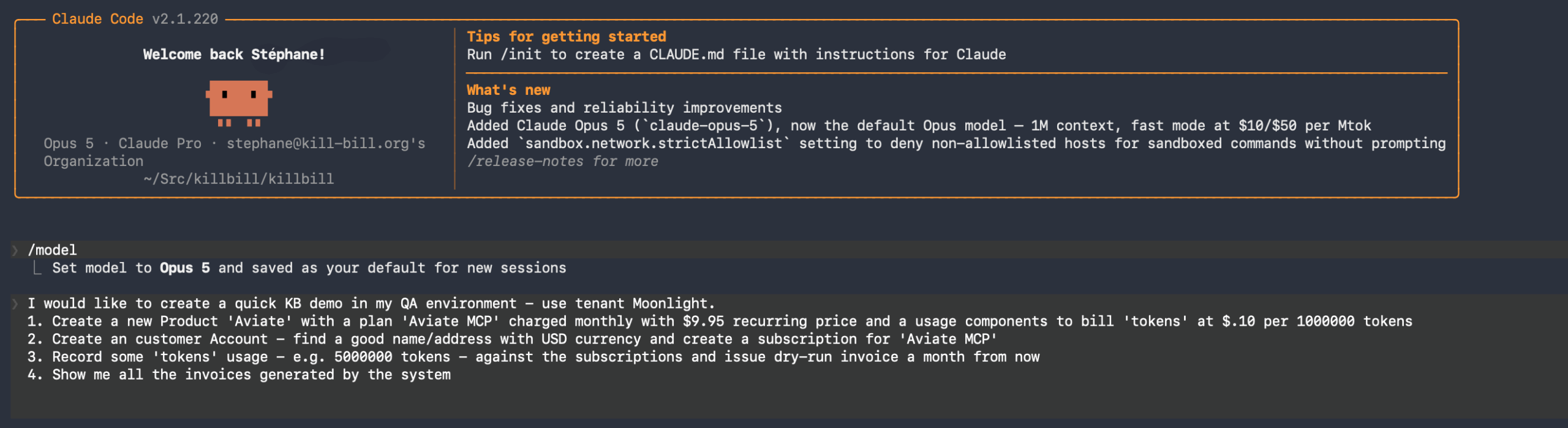
Four steps, in English, with no API calls written by hand: i/ Create a product with a monthly recurring price and a usage component. ii/ Create a customer, subscribe them. iii/ Record usage. iv/ Show me the invoices:
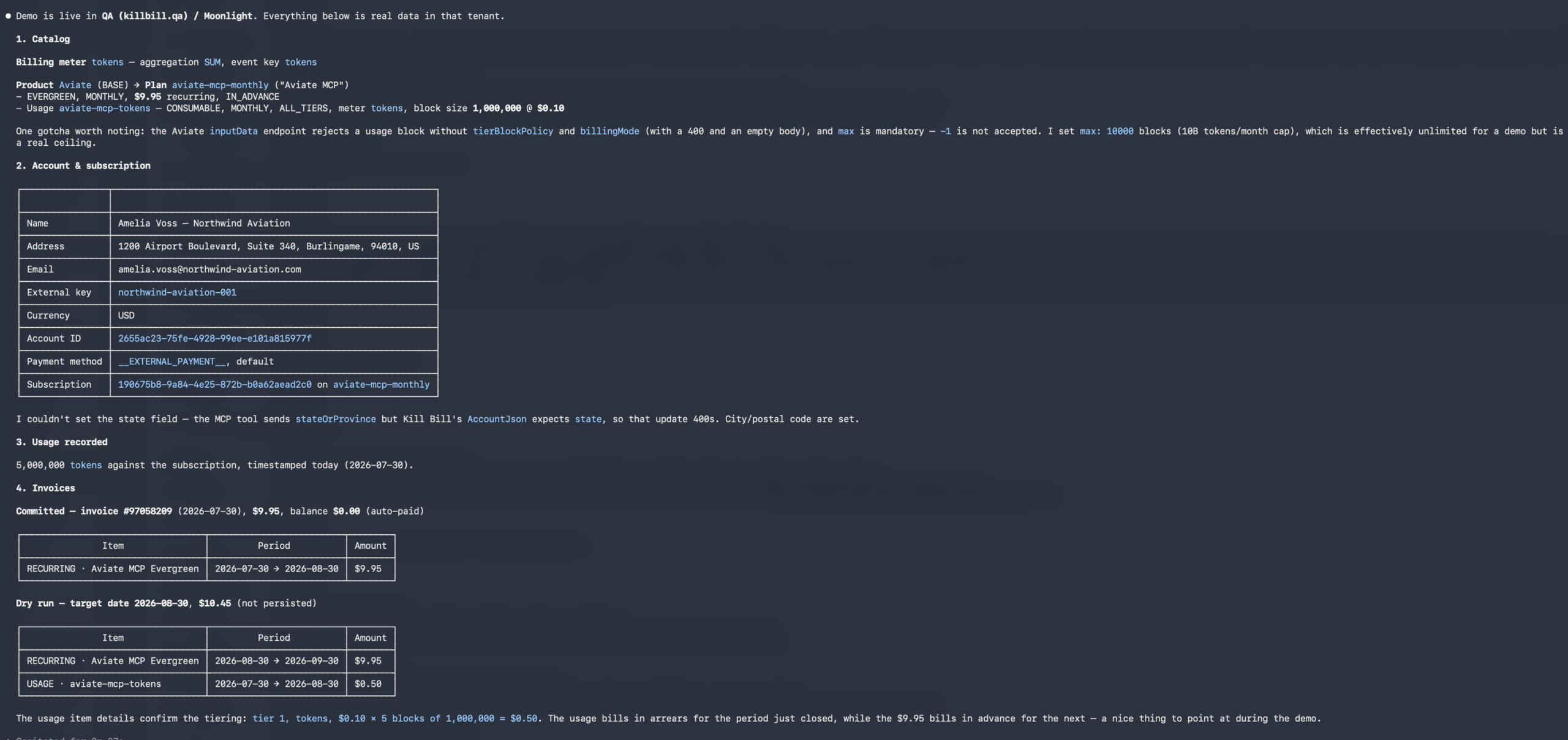
The model created the following:
• A product with a plan priced at $9.95/month and a billing meter with tiered configuration priced at $0.10 per million tokens.
• An customer account
• A subscription for the account
• Five million tokens of usage
The result is a committed invoice for $9.95, and then a dry-run invoice a month out for $10.45 — the recurring charge billing in advance for the next period, the usage billing in arrears for the one that just closed. That last detail is the one a billing engineer notices, and nobody prompted for it. It’s just how Kill Bill works, and the agent read it back correctly off the invoice it had generated.
What the server actually is
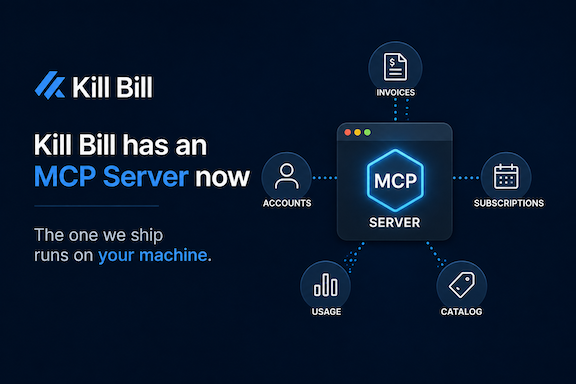
The aviate-mcp server exposes Kill Bill and Aviate as tools an MCP client can call. About 127 of them, in three families:
• kb_*: Kill Bill’s core REST API – i.e. accounts, subscriptions, invoices, payments, catalog, tags, custom fields, blocking states, audit logs. Everything you’d otherwise reach through `/1.0/kb`.
• aviate_*: Aviate REST APIs – i.e. API-driven catalog, billing meters, wallets, coupons, usage recording.
• admin: whoami, list_contexts, use_context.
That last family is small and does the most interesting work, because of how Kill Bill is shaped.
Kill Bill doesn’t have “an account”
Most SaaS billing platforms have one axis of isolation. You sign up, you get an account, everything lives inside it, and there’s a test mode and a live mode distinguished by which API key you’re holding. For a platform shaped like that, an MCP server that binds a token to the account you logged into is a faithful model of the world. Kill Bill has two axes, and they’re independent:
• A deployment is an install of Kill Bill — a base URL, a database, a set of plugins, its own RBAC users. You run one per environment: QA, staging, production. Larger shops run more, per region or per legal entity.
• A tenant lives inside a deployment and is the real isolation boundary — its own catalog, accounts, invoices, payments. Tenants separate one customer from another, one brand from another, one product line from another.
Kill Bill authenticates on both axes separately: RBAC credentials say *who you are*, the tenant API key and secret say *which world you’re operating in*. So the thing an agent needs to point at isn’t an account. It’s a cell in a matrix: which deployment × which tenant.
There are two obvious ways to paper over that, and both are worse than they look:
• Register the MCP server once per tenant and your client config grows keeps growing for each point in the matrix – i.e. more entries, more credential sets, and more things to revoke when someone leaves. The agent still reaches the wrong one; it just does it by picking the wrong server name
• Make the tenant a tool argument and the model becomes the thing choosing which credentials get used. That’s not an access-control boundary, that’s a suggestion.
So, the admin tools do it the way kubectl does. It uses list_contexts to show the deployment/tenant pairs this connection is allowed to reach; it uses use_context to switch the session default. Any individual call can override inline.
And every tool result comes back stamped with a [context: deployment/tenant] banner, so the transcript itself records which environment each answer came from. You can see that in the screenshot above — the response opens by stating which deployment and tenant it’s in, before anything else.
The hosted version, and why you can’t have it 🙂
We built the hosted version first, and it works.
It’s a single Cloudflare Worker playing two roles: i/ an OAuth 2.1 authorization server that delegates login to Aviate’s Cognito user pool, and ii/ an MCP resource server exposing the tools. You point a client at a URL, a browser opens, you sign in with the Aviate account you already have, and a consent page lists the Kill Bill deployments and tenants already registered to you. You tick the ones this connection may reach and pick a default.
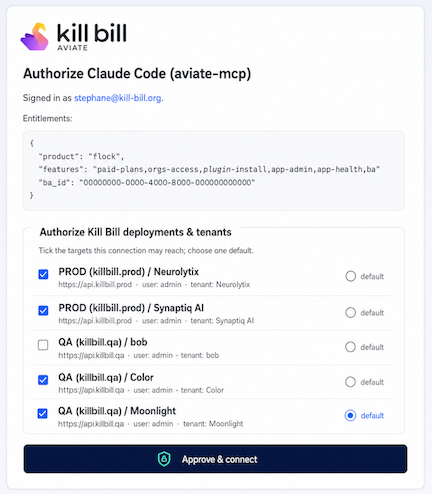
The token that comes out of that carries the menu — deployment ids, tenant ids, labels, base URLs, the RBAC username. All non-secret. The actual credentials stay server-side in a registry keyed by the Cognito subject, and get resolved per call, only after the requested target has been checked against the menu. Steal the token and you have a list of names. We’re pleased with it. It’s also staying internal, and the reasons are worth being blunt about:
• Kill Bill was never designed to face the public internet. A Kill Bill hosted MCP server has to reach each customer’s Kill Bill somehow. That means either every customer’s billing system becomes publicly reachable, or we build private connectivity into every customer network. The first is a non-starter. The second is a business we don’t want to be in.
• We would become the custodian of every customer’s billing credentials. The hosted model stores your Kill Bill RBAC password and tenant API secret in our infrastructure. We looked hard at hardening that — envelope encryption with a KMS, moving secrets out of shared storage into per-user Durable Objects, short-lived Kill Bill session tokens instead of standing credentials. All of them help. None of them changes the shape of the problem: a hosted multi-tenant secret store is a standing liability, with a blast radius, an insider-access surface, and a bad day waiting in it.
Kill Bill is not a SaaS, and it isn’t structured to carry that risk. We’re a bootstrapped company that has spent fifteen years telling people the point of Kill Bill is that they own their billing stack. Shipping a product whose first requirement is “give us your production credentials and expose your billing system to the internet” would contradict the entire thesis.
So the hosted server runs against our own Kill Bill deployments, with our own Cognito, for our own team. It earns its keep two ways: it’s how we demo, and it’s a genuinely useful lab for finding out how well a model handles real billing work. Which brings us to the honest part of that demo above.
What the agent got wrong, and why we kept it in
Look again at the response screenshot. Two things in it aren’t successes:
the Aviate `inputData` endpoint rejects a usage block without `tierBlockPolicy` and `billingMode` (with a 400 and an empty body), and `max` is mandatory — `-1` is not accepted.
I couldn’t set the state field — the MCP tool sends `stateOrProvince` but Kill Bill’s `AccountJson` expects `state`, so that update 400s.
The first is an API returning a 400 with an empty body, which is a bad error message for a human and a worse one for an agent. The second is a genuine field-name mismatch in our own tool definition. Neither of those was found by a test suite. They were found by an agent trying to do a real task and reporting what got in its way. That’s most of the internal value. An agent driving your API end to end is a fairly brutal usability audit, and it writes up its own findings.
What we’re shipping: run it yourself
The version customers get runs as a local process, next to their own Kill Bill. The MCP host spawns it over stdio and talks to it on the pipe. There’s no hosted endpoint, and no OAuth between your client and the server, because there’s no network in between — stdio runs on process trust.
Both problems dissolve rather than getting mitigated:
• The hop to Kill Bill is private:The MCP server sits inside your network and talks to Kill Bill the way any other internal service would. Nothing about Kill Bill becomes publicly reachable. The only surface that exists is the curated, auth-gated tool set — never Kill Bill’s raw admin API.
• We hold nothing: Your Kill Bill credentials come from a config file you own, in whatever secret manager you already use. There is no copy anywhere else.
This is also just the normal shape for a distributable MCP server. GitHub, Stripe, Postgres and everyone else ship local servers configured via env or config, with secrets staying with the operator. The industry split is exactly ours: a hosted connector for the SaaS-shaped case, and a self-hosted server for everyone who won’t expose their backend or hand over their keys.
The kb_* tools need no login at all — they use the credentials in your config. The aviate_* tools do need one, because the Aviate plugin validates a Cognito id_token as its licensing and entitlement anchor. So there’s a one-time aviate login:
It starts a loopback listener on localhost, opens your browser to the same Cognito Hosted UI the Aviate console uses, catches the authorization code on the way back, and exchanges it for an id_token and refresh_token. Native-app OAuth, per RFC 8252 — a public client with PKCE and no client secret, because a secret shipped inside software running on someone else’s laptop isn’t a secret.
The tokens land in ~/.aviate-mcp/token.json with 0600 permissions. The server serves the id_token as a Bearer on Aviate calls and refreshes it automatically, and it is never returned to the MCP client — it doesn’t enter the model’s context, a tool argument, or a transcript.
One thing to be clear about: this is built for interactive use, a human and a copilot working together. An unattended agent running on a schedule wants machine credentials, not a browser login, and that’s a different variant we haven’t built.
One core, two shells, three ports
The thing that makes both of these maintainable is that they are the same code.
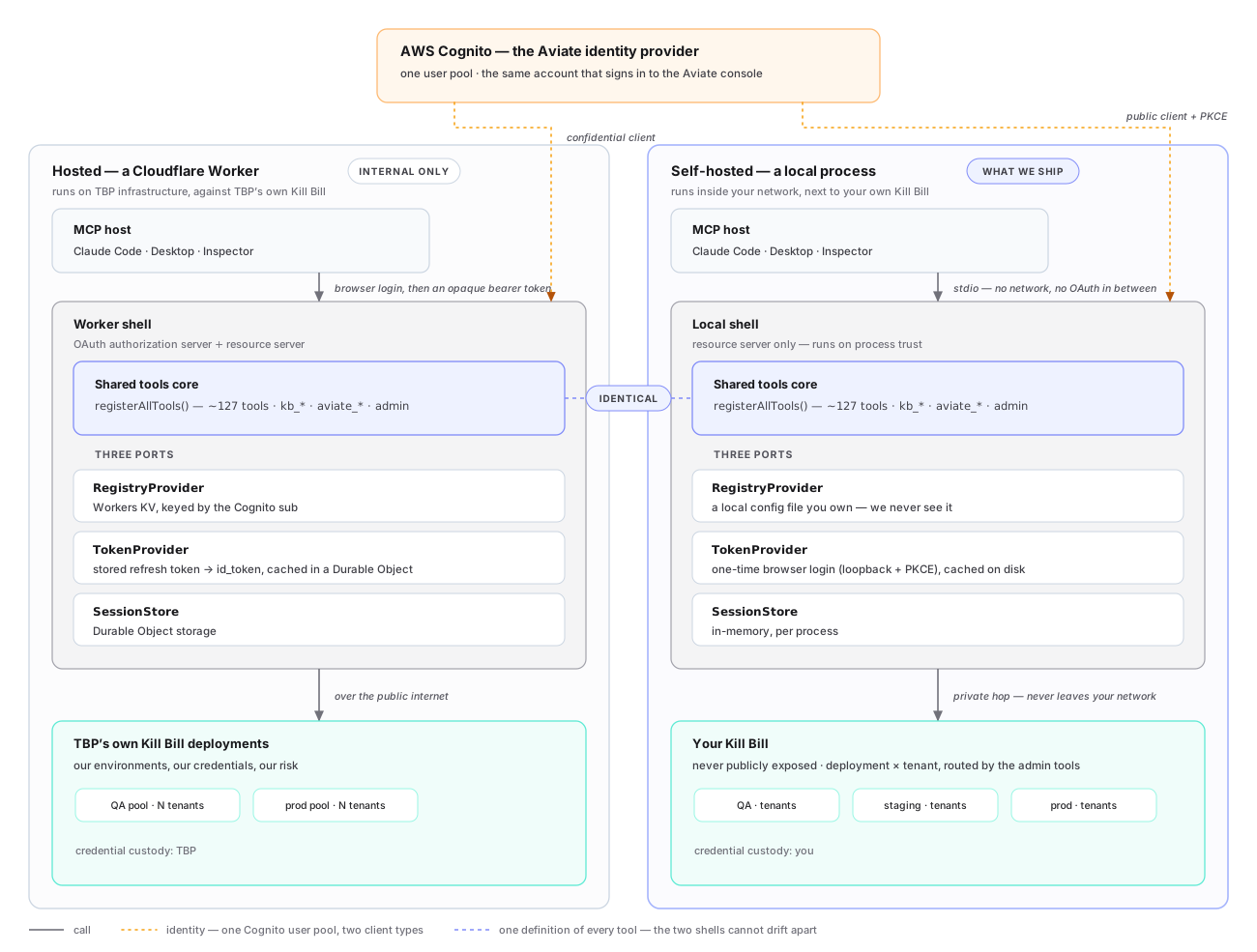
We pulled the tools into a runtime-agnostic core that depends on three interfaces and nothing else. Each shell supplies its own implementations:
• RegistryProvider: Kill Bill credentials using Workers KV, keyed by Cognito sub for hosted version and a local JSON config for self-hosted
• TokenProvider: Aviate id_token using a minted from the stored refresh token cached in a Durable Object for hosted version and the token from the aviate login cached on disk for self-hosted
• SessionStore: Session state using a Durable Object storage for hosted version and the in-memory store for self-hosted
The registerAllTools(server, ctx) is shared. Same 127 tools, same routing, same authorization gates, same Kill Bill and Aviate clients. Only the edges differ, and the two shells cannot drift apart, because there’s only one definition of what a tool is.
Three ports turned out to be exactly the right number. Everything that differs between “a Cloudflare Worker holding an OAuth grant” and “a Node process reading a config file” reduces to: where do credentials come from, where does the identity token come from, and where does session state live. Everything else was already runtime-agnostic.
Where this goes
The more interesting direction is what a connection scoped to several environments can do that one scoped to a single tenant can’t. Aviate Health watches billing integrity rather than infrastructure — invoice correctness, payment success rates, revenue anomalies. Expose that over MCP and the routing described here stops being plumbing: an agent can sweep every deployment and tenant you’ve pointed it at, on a schedule, and tell you what changed. Not a dashboard someone has to build, and not one anyone has to remember to open.
Kill Bill is open source (Apache 2.0) and has been running production billing for fifteen years. Aviate is the commercial control plane on top of it. The self-hosted MCP server described here ships as part of Aviate.